On this page
- What Is Smart Home Lighting Control and How Does It Work?
- Which Features Matter in a Smart Lighting Control System?
- What Types of Smart Lighting Can You Choose?
- Does a Smart Switch Need a Neutral Wire in Indian Homes?
- How Do You Choose Smart Home Lighting Control for an Indian Home?
- How Do You Install and Set Up Smart Home Lighting?
- Does Smart Lighting Lower Electricity Bills in India?
- Which Smart Lighting Systems Are Available in India?
- What Should You Plan Before Adding Smart Lighting Control?
- Smart home lighting control lets you switch, dim and schedule lights from an app, a voice assistant or sensors.
- Indian switch boxes often carry only the phase (live) wire, so check for a neutral before buying smart switches.
- Smart bulbs need no rewiring; smart switches and touch panels need an electrician and the MCB switched off.
- Most smart lighting pairs on 2.4 GHz Wi-Fi; plan router coverage before you buy.
- The big saving comes from LED lamps; schedules and sensors trim waste on top.
Smart home lighting control is a system that lets you switch, dim, colour-tune and schedule your lights from a phone app, a voice assistant or a sensor instead of only a wall switch. You can add it bulb by bulb, or wire it into the switchboards while building or rewiring a home.
This guide covers the parts, the wiring rules that matter in Indian homes, the installation steps and the real effect on your electricity bill.
What Is Smart Home Lighting Control and How Does It Work?
Smart home lighting control works by putting a small radio and a relay or LED driver inside a bulb, switch or plug. The device receives commands over a wireless network and turns the light on, off or to a set brightness.
A typical system has four parts:
- Smart device: a smart bulb, smart switch, retrofit module or smart plug.
- Network: your home Wi-Fi, Bluetooth, or a low-power mesh such as Zigbee.
- Hub or bridge (optional): a box that links Zigbee or similar devices to your router.
- Controller: the brand's app, a voice assistant such as Amazon Alexa or Google Assistant (on a Google Home speaker), or Apple Home with Siri.
Wi-Fi devices connect straight to your router and work from anywhere through the internet. Bluetooth devices talk to your phone over a short range and usually need a gateway for remote control. Zigbee is a low-power mesh protocol in which each mains-powered device relays signals, and it needs a hub. Matter is a newer standard that lets certified devices from different brands work in the same app.
Professional systems use wired protocols. KNX is an open standard for building automation, and DALI-2 (Digital Addressable Lighting Interface, version 2) controls individual light drivers. Both are more common in offices and large villas than in apartments.
Which Features Matter in a Smart Lighting Control System?
The features that matter most in a smart lighting control system for home are reliable remote control, schedules, dimming and support for the voice assistant you already use.
- Remote control: switch lights from the app when you are away from home
- Schedules and scenes: timed on/off and one-tap groups such as "Movie" or "Night"
- Dimming and colour temperature: warm light at night, cool light for work
- Voice control: works with Alexa, Google Assistant or Apple Home
- Sensors: motion and daylight triggers for stairs, balconies and corridors
- Manual fallback: the wall switch still works if Wi-Fi or the internet drops
- Low standby power: under 0.5 W per device when off
- Local service: a brand with support and spare parts in Bengaluru
What Types of Smart Lighting Can You Choose?
The main types of smart lighting are smart bulbs, smart switches or touch panels, retrofit modules behind existing switches, smart plugs and smart LED strips. Each suits a different stage of a home.
Smart lighting types compared
Pick by whether you can change the wiring| Type | Rewiring needed | Best for | Watch out for |
|---|---|---|---|
| Smart bulb Easiest start | None, fits an existing holder | Rented homes, lamps, single rooms | Wall switch must stay on or the bulb goes offline |
| Smart switch or touch panel New builds | Yes, replaces the switch plate | Whole-home control of existing fittings | Usually needs a neutral and a deeper box |
| Retrofit module | Small, fits behind the old switch | Keeping your current modular switches | Space in the box; some models need a neutral |
| Smart plug | None, plugs into a socket | Table lamps, festive lighting | On/off only, no dimming |
| Smart LED strip | Needs a nearby socket or driver point | Cove lighting, false ceilings, under-cabinet | Driver location and heat in closed coves |
Does a Smart Switch Need a Neutral Wire in Indian Homes?
Yes, most smart switches need a neutral wire at the switch box, because the switch's radio must stay powered even when the light is off. The neutral is the return conductor that completes the circuit back to the distribution board.
Many Indian homes do not have one at the switch. Switch boxes traditionally carry only the phase (live) wire, while the neutral runs straight to the light fitting. A switchboard that also holds a socket usually has a neutral nearby, but a switch-only board often does not.
No-neutral smart switches exist. They keep themselves powered by passing a tiny current through the lamp even when it is off. With low-wattage LEDs this can cause faint glowing or flicker, which is why some brands supply a bypass device fitted at the lamp.
Building or rewiring? Ask your electrician to run a neutral to every switch box. Retrofitting? Have the box opened and checked before you buy. No neutral means smart bulbs, a module at the fitting, or a no-neutral switch rated for your LED load.
Our guide to house electrical wiring explains phase, neutral and earth conductors in more detail.
How Do You Choose Smart Home Lighting Control for an Indian Home?
Choose smart home lighting control in India by matching the system to your wiring, your Wi-Fi coverage, your budget and the support available locally.
- Wiring: neutral at the switch box decides between switches and bulbs
- Box size: smart switches and modules are bulkier than plain switches, so check box depth
- Wi-Fi: a 2.4 GHz signal must reach every switchboard, including stairs and terraces
- Standards: buy LED lamps registered with BIS (Bureau of Indian Standards) under IS 16102, the standard for self-ballasted LED lamps
- Ecosystem: pick one app and one voice assistant for the whole home
- Power cuts: check how devices behave after a power cut, since some return to on
- Support: prefer brands with service in Bengaluru and a clear warranty
Any new wiring should follow IS 732:2019, the Indian code of practice for electrical wiring installations, and the National Electrical Code of India (SP 30:2023). For an overview of how Indian homes are wired today, read our explainer on house wiring in India.
How Do You Install and Set Up Smart Home Lighting?
You install smart home lighting in three stages: check the wiring and Wi-Fi, have the switches or modules fitted with the power off, then pair every device in one app and set up rooms, scenes and schedules.
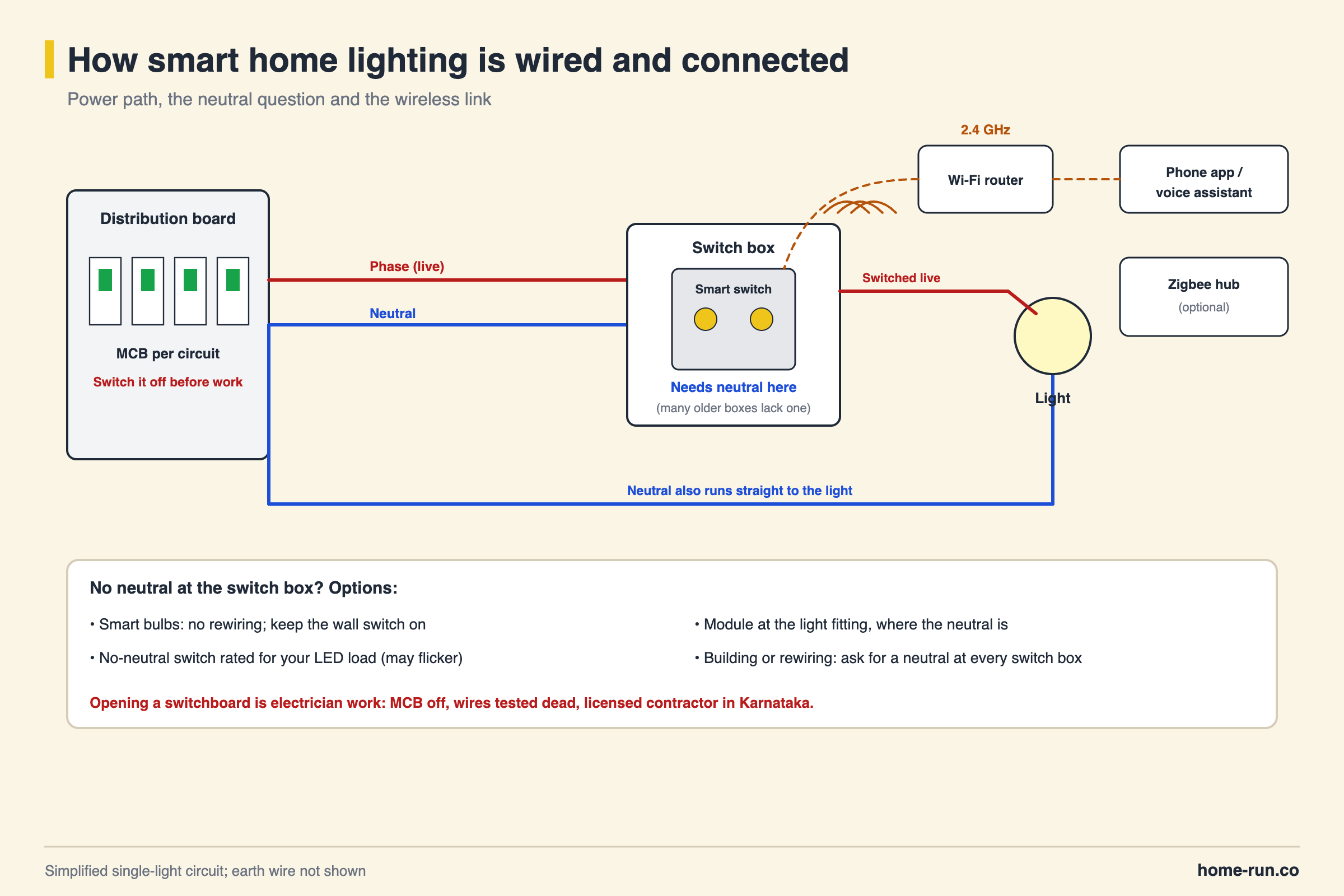
Turn off the MCB (miniature circuit breaker) for that circuit at the distribution board, and confirm the wires are dead with a tester before touching anything. In Karnataka, electrical installation work must be done by a licensed electrical contractor and permit-holding wiremen under the state's licensing rules. Fitting a smart bulb or plug is DIY; opening a switchboard is not.
- Plan the rooms. List each switchboard, what it controls and whether you want dimming, scenes or sensors.
- Check the boxes. With the MCB off, have the electrician confirm a neutral and enough depth in each box.
- Check Wi-Fi coverage. Stand at each switchboard and test the 2.4 GHz signal on your phone. Add a mesh node where it drops.
- Fit the hardware. The electrician replaces switch plates or fits retrofit modules, following the maker's wiring diagram, then restores power.
- Pair the devices. Install the brand app, connect your phone to the 2.4 GHz network and add devices one by one.
- Name and group. Name each light clearly ("Hall ceiling", "Bedroom lamp") and group them by room.
- Link voice and scenes. Connect Alexa, Google Assistant or Apple Home, then create scenes and schedules.
- Test the fallback. Switch the router off and confirm the wall switches still work.
Common setup problems are a phone on the 5 GHz band during pairing, a weak signal at the far end of the home, and LED flicker on no-neutral switches. Junction boxes for modules and drivers should stay accessible; our electrical junction box guide covers sizing and placement.
Plan and survey
List switchboards, check neutral and box depth, test Wi-Fi.
Electrician fits hardware
MCB off, switches or modules wired, power restored and tested.
Pair and name devices
One app, clear names, rooms and voice assistant linked.
Tune schedules and scenes
Adjust timings and sensor delays to how the family uses each room.
Does Smart Lighting Lower Electricity Bills in India?
Smart lighting lowers electricity bills mainly because smart bulbs are LEDs, which use at least 75% less energy than incandescent bulbs and last up to 25 times longer, according to the US Department of Energy. Schedules, dimming and motion sensors then cut the hours lights stay on for no reason.
Smart devices also draw a little power when off. In a 2019 study of 30 smart LED bulbs, 21 stayed under 0.5 W in standby. That draw is small, but it eats into the savings if you replace LEDs you already have.
The example uses typical lamp wattages, not tested figures. If your home already has LEDs, the saving from smart control alone is small, so buy it for comfort and convenience first.
Which Smart Lighting Systems Are Available in India?
Smart lighting systems in India fall into two groups: app-based Wi-Fi products you add room by room, and panel or hub-based home automation fitted while building or rewiring. Lighting brands such as Wipro sell smart LED bulbs, while makers such as Ankur sell touch panels and home controllers.
App-based Wi-Fi devices
Most homesPoints
- Smart bulbs, plugs and retrofit modules, added one at a time
- No hub needed; set up from the brand app
- Works with Alexa and Google Assistant out of the box on most models
- Low entry cost; one Indian maker lists retrofit switches from ₹2,700
Panel or hub-based automation
New buildsPoints
- Smart touch panels replace switchboards, often with fan and AC control
- Needs planning at the wiring stage, including neutral at each box
- Central controller for scenes across the whole home
- Higher cost; the same maker lists panels from ₹9,900 to ₹34,500
Prices are list prices seen on Ankur Lighting's website in November 2026 and change often. Compare features, app ratings and local service rather than brand names alone.
What Should You Plan Before Adding Smart Lighting Control?
Before adding smart lighting control, decide which rooms need it, confirm your wiring and Wi-Fi, and agree the plan with a licensed electrician who has fitted smart systems before.
- Start with one or two rooms and expand once the app suits your family
- Ask for a neutral at every switch box if you are building or rewiring
- Keep one brand or one Matter-certified ecosystem for easy control
- Leave space and access for modules, LED drivers and junction boxes
- Keep the wall switch working as a manual backup
- Get a written quote listing every device and the labour
Rewiring for smart lighting?
LED lights, switches, wires and MCBs delivered across Bengaluru.